Quick answer
Choose a network NFC reader by who controls the card operation and where events are received, then confirm firmware, connection and power. Ethernet does not mean PoE is included. Test network loss and recovery with the selected configuration; offline storage, replay and deduplication are not assumed.
Catalogue facts come from official manufacturer references. Price, stock, lead time and compatibility in your application need confirmation for the selected configuration. Sources and scope · Read our editorial method
A network NFC purchase starts with the application task: reading a UID, accessing card data or writing a tag. Then decide whether your application controls the reader or receives reader events. A network connector alone does not settle that choice. Use the card compatibility guide to define the card operation, then specify the network workflow.
Choose the communication role
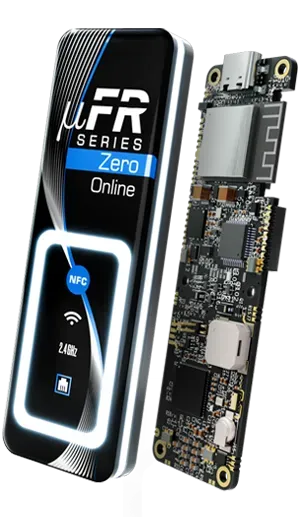
The manufacturer’s Zero Online family documentation describes these modes. Confirm the mode and behaviour against the selected firmware.
| Family mode | Communication role | What to confirm |
|---|---|---|
| Transparent | Host-side NFC operation over USB | Host software and required card commands |
| Slave | Host-side NFC operation over Wi-Fi or Ethernet | Network connection, API and host ownership |
| Master | Reader posts scanned card information to a predefined server using HTTP POST | Selected firmware, event content and stable Wi-Fi or Ethernet |
Master mode still needs a receiving application and your event-handling rules; it is not a complete standalone business system. Record who operates and maintains that application.
Select an explicit hardware configuration
Use the network reader category or reader finder to shortlist these catalogue configurations:
| Candidate | Configuration shown here | Order clarification |
|---|---|---|
| PR-501 | USB, Wi-Fi and BLE | Ethernet is not assumed included; confirm required hardware and firmware |
| PR-502 | Default USB, Wi-Fi and BLE | Select Ethernet or PoE explicitly; confirm the adapter and cables |
| PR-503 | Ethernet, USB, Wi-Fi and BLE; default without PoE | PoE is a separate upgrade; confirm the power arrangement |
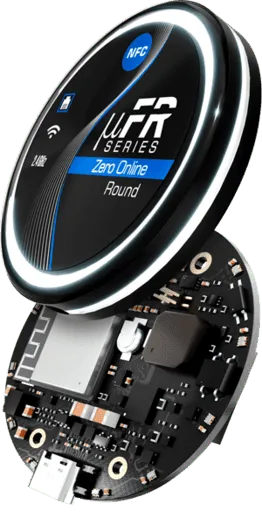
Round accessory descriptions are inconsistent in the manufacturer’s listing. Obtain a written supplied-items list rather than inferring it from a series image or a connector name.
Specify the network event contract
For HTTP or MQTT requirements, confirm the exact firmware and mode. A family protocol list does not establish that every model and delivered firmware implements your workflow. Consult the network software references, then agree:
- Direction: host commands, reader events or both; identify the receiving application and its owner.
- Payload: card identifier or operation result, representation, reader identity and any required event fields.
- Response: expected acknowledgements, rejected messages, timeouts and how failures become visible to operators.
- Operation: distinguish card detection, the requested card transaction and successful backend receipt.
Describe authentication requirements without putting passwords, tokens or card keys in the public inquiry.
Verify recovery before acceptance
Agree expected behaviour before running a repeatable sequence:
- Present the authorized sample cards and compare reader-side observations with received events.
- Interrupt the network, restore it and record missing, repeated or reordered events.
- Restart the reader and receiving application separately; repeat the required card operation.
- Record settings retained, operator actions needed and the observed recovery time.
Do not assume offline storage, replay or duplicate removal. These are acceptance questions for the selected configuration. Keep expected and observed results together with firmware and application versions, using the sample test checklist.
Confirm installation and power
Specify Ethernet outlet or Wi-Fi commissioning, power source, mounting position and the final panel. Ethernet support does not mean PoE is supplied. Confirm the selected PoE upgrade, adapter, cables, enclosure and current drawing in the quotation. Repeat the card operation in the intended installation; a bench result covers that setup.
Send a useful procurement brief
Include card/chip; required operation; communication direction; receiving software and owner; firmware; network; power and PoE requirement; mounting; recovery expectations; sample and later quantities. Mark unknowns for confirmation.
Request network selection advice or discuss an Ethernet sample. Configuration, supplied items and commercial terms need a project-specific quotation.
Use the network NFC integration project page to organize the receiving application, network and power requirements, sample checks and procurement brief. The page links these requirements to candidate models and a project inquiry.
Sources and scope
Manufacturer references checked on 6 October 2026: Zero Online family and modes, Online default, Online Round and Online Ethernet. The specification and acceptance steps are editorial procurement guidance, not measured deployment results or a compatibility guarantee.
Questions to consider
Does an Ethernet reader include PoE?
Not automatically. The listed PR-503 default excludes PoE; the PoE upgrade must be selected and confirmed in the quotation.
Does a network NFC deployment need a computer?
The manufacturer describes USB host and Wi-Fi/Ethernet host modes, plus Master mode that posts scanned card information to a server. Confirm the selected firmware. Master still needs a receiving server and your application logic.
Will scans be stored and resent after a network outage?
Do not assume offline storage, replay or duplicate removal. Agree the behaviour for the selected firmware and verify it with the reader and receiving application before acceptance.