D-Logic / PR SDK
PR-106
Manufacturer model reference
µFR Zero XL OEM
PR numbers are NFCDock catalogue numbers; manufacturer models help match technical documentation.
A large-antenna OEM module to evaluate in the finished equipment enclosure.
A quote for your project
Share your quantity, card type and target platform. Configuration and availability are confirmed with your quote.
Request a quote Chat on WhatsAppSee the specificationsCheck this configuration
- This selection is the USB OEM configuration; TTL UART and RS232 are separately ordered variants.
- Use the current mechanical drawing for mounting and cable clearances.
- Reading performance depends on tags and mounting; no deployment distance is guaranteed.
Where it fits
- Kiosk and equipment integration
- Reader placement behind a non-metallic panel
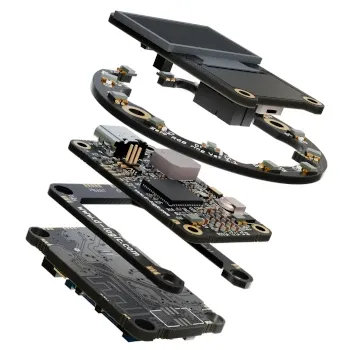 Series reference image. Confirm the exact enclosure for your model.
THE DETAILS
Interfaces & specifications
Integration
| Frequency | 13.56 MHz |
|---|---|
| Connection | USB |
| Supported standards | ISO/IEC 14443 A/B, ISO/IEC 15693 |
| Software path | Manufacturer SDK / uFCoder API |
| Main workflow | Embedded reader integration |
| Configuration | OEM module; enclosure not included in this selection |
Source: Manufacturer model information · Checked 2026-10-01
Software & technical references
µFR SDK / API
Match the required API call to the card, firmware and target host library. A µFR example is not a PC/SC or libNFC application.
Links reviewed: . Links open external manufacturer or project websites. Source documentation may be in English. Check the current release, licence and model support at the source before installing or updating software.
INTEGRATION NOTES
Where it fits
Select the PR-106 OEM as an integration component when a larger antenna area fits your equipment. It requires mechanical mounting and application development rather than a finished desktop installation.
Integration choices
This selection follows the manufacturer’s USB OEM listing with ISO/IEC 14443 A/B and ISO/IEC 15693 support. TTL UART and RS232 are other available interface variants, not additional interfaces included in this USB configuration. Confirm a separate variant if your host requires a serial connection, then check mounting and tags before requesting a production quote.
- Use the current mechanical drawing for mounting and cable clearances.
- Reading performance depends on tags and mounting; no deployment distance is guaranteed.
The image is the manufacturer’s series illustration. Request a photograph and drawing of the selected configuration before purchase.
Prepare a quotation
Send a sample-card description, operating system, connection, application task and quantity. For embedded installations, include the panel material and mounting sketch. We confirm the selected configuration and commercial terms before an order.
Manufacturer source
Official model information · Checked 2026-10-01.
About this reader
What should I include in a quotation request?
Send the exact card or tag, host system, required operation, connection and quantity. Configuration and commercial terms are confirmed in the quotation.
How are price and delivery confirmed?
A quotation confirms the selected configuration, price, delivery terms and required compliance documents for your order.